The guided tour at /tour is EffectTalk's structured learning path for Effect. It's organized into five groups, each covering a core area of Effect, with lessons that build on each other. Every lesson has multiple steps, each pairing an explanation with code you can read and run in the browser.
This post walks through how the tour works — the lesson index, step navigation, the code editor, progress tracking, and how to get the most from each lesson.
The Lesson Index
When you visit /tour, you see every lesson organized under five groups:
- Fundamentals — Core Effect concepts: lazy evaluation, the three type channels (success, error, requirements), and generators.
- Composition — Building systems from pieces: layers, resource management, cause and defects, runtimes.
- Concurrency — Parallel execution: retries, fibers, parallel processing, queues, refs.
- Data & I/O — Working with data: streams, chunks, testing with layers, metrics.
- Validation — Schema and data validation.
Lessons are numbered sequentially across all groups, so you always know where you are in the overall sequence. Each lesson card shows the title, a short description, the step count, and — if you've completed every step — a green "Done" badge with a checkmark.
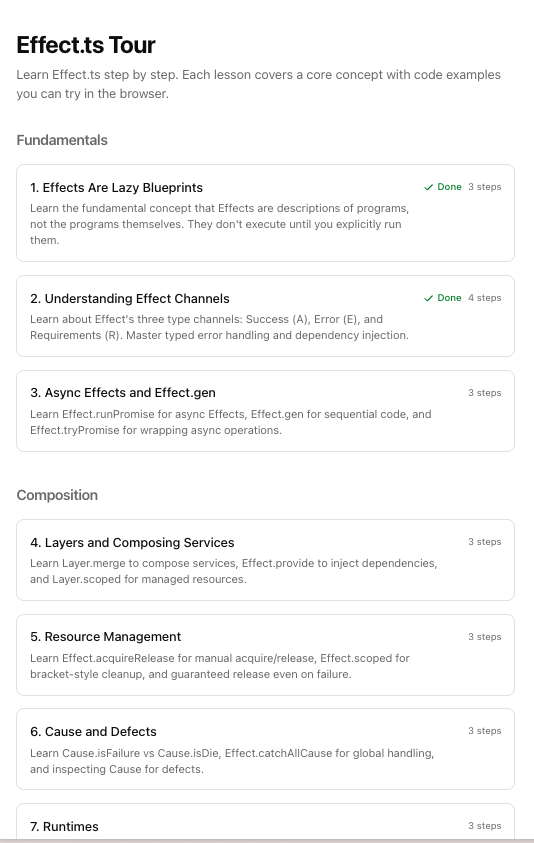
The lessons within each group are ordered intentionally. Fundamentals starts with "Effects Are Lazy Blueprints" because that mental model unlocks everything else. Composition starts with layers because that's where most production Effect code gets its structure. You can jump around, but the ordering reflects real dependencies between concepts.
Inside a Lesson
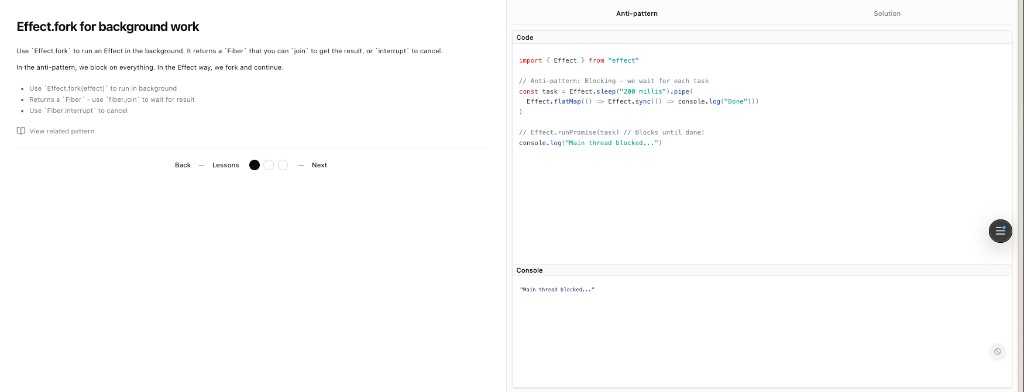
Click a lesson and you land on its first step. The layout splits into two columns on desktop: the explanation on the left, the code editor on the right. On mobile, the explanation stacks above the code.
The explanation gives you the concept in plain language — what this step teaches, why it matters, and what to look for in the code. Some steps include hints below the explanation: a bulleted list of pointers if you want a nudge before reading the code.
The code editor uses Sandpack (the same engine behind CodeSandbox) with Effect pre-configured. You see syntax-highlighted TypeScript and a console panel below that shows output when the code runs. The point is to study and run the code; editing is disabled in tour steps.
Many steps have two tabs above the code: Anti-pattern and Solution. The anti-pattern tab shows the naive or incorrect approach — the way you'd write it without Effect, or with Effect used badly. The solution tab shows the Effect way. This side-by-side comparison is the fastest way to internalize why Effect's patterns exist. Some solution tabs include a feedback message below the code — an italicized note that reinforces the key takeaway.
If a step relates to a pattern in the pattern library, you'll see a "View related pattern" link with a book icon below the explanation. Clicking it takes you to the full pattern at /patterns/{id}, and a back button on the pattern page returns you to the tour flow. If the linked pattern was recently added, a green "New" badge appears next to the link.
Step Navigation
At the bottom of each lesson, a navigation bar shows your position and lets you move between steps.
The center of the bar has small circular indicators — one per step. The current step is filled and highlighted. Completed steps show a checkmark. Unvisited steps are muted. Each circle is clickable and shows the step title on hover, so you can jump to any step directly.
To the left: a Back button that goes to the previous step, or back to the lesson index if you're on step one. Between Back and the step circles: a Lessons link that always returns to the /tour index.
To the right: a Next button that advances to the next step, or Finish on the last step, which marks the step complete and returns you to the lesson index. Clicking Next automatically marks the current step as completed — you don't need to do anything extra.
Progress Tracking
The tour tracks your progress at the step level.
If you're not signed in, progress is saved in your browser's local storage. It persists across sessions on the same device but won't follow you to a different browser or machine.
If you sign in with GitHub, progress syncs to your account. From that point on, progress is saved server-side and available on any device.
On the lesson index, a lesson shows the green "Done" badge only when every step in that lesson is marked complete. The step indicators inside each lesson show individual step completion, so you can see exactly where you left off.
Tips for Getting the Most Out of It
Follow the group order, at least for Fundamentals. The first three lessons — lazy effects, the three channels, and generators — establish the mental model that everything else builds on. Jumping to Concurrency before understanding how Effect represents errors and requirements will make the later lessons confusing.
Read the anti-pattern first. When a step has both tabs, start with the anti-pattern. Understand what the naive approach looks like and why it's limited. Then switch to the solution tab. The contrast makes the Effect approach click faster than reading the solution in isolation.
Use the related pattern links. When a step links to a pattern, open it. The tour teaches concepts; the patterns show production usage. The tour step might explain how Effect.retry works with a schedule. The linked pattern shows how to build a retry policy for an HTTP client with exponential backoff, circuit breaking, and logging. They complement each other.
Sign in early. If you plan to work through more than a few lessons, sign in with GitHub before you start. Your progress will sync across devices and you won't lose anything if you clear your browser data.
Come back to it. The tour isn't designed to be completed in one sitting. Each group is a self-contained topic. Do Fundamentals one day, Composition the next week, Concurrency when you actually need to parallelize something. The progress tracking exists so you can pick up where you left off.
What's Next
We're planning additional tour groups for specific domains — building HTTP APIs with Effect, database integration, and working with existing Node.js codebases. These will follow the same format: explanation, code, anti-pattern versus solution, and links to the pattern library.
Head to /tour and start with Fundamentals. If you find a step that's confusing or a concept that needs better explanation, open an issue on GitHub.